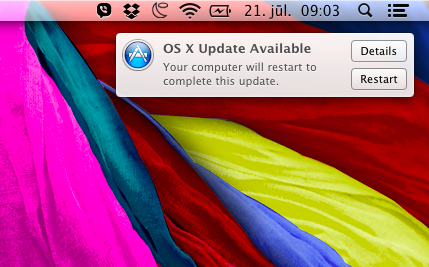
So when exactly will you restart, Mac? Do you count seconds somewhere under the hood? Do I need to worry about saving my stuff? How do I hide this popup? After some time it disappeared by itself and my mac never restarted. Strange.
So when exactly will you restart, Mac? Do you count seconds somewhere under the hood? Do I need to worry about saving my stuff? How do I hide this popup? After some time it disappeared by itself and my mac never restarted. Strange.
Here is a tip that could potentially save you several hours (Mountain Lion): if you have custom keyboard layout, put it in /Library/Keyboard Layouts and NOT in /System/Library/Keyboard Layouts. I know you shouldn't put stuff in System directories, but still... misleading.
BTW: Ukelele just made my life with Mac a little easier (while Mac itself took 2 hours from me by being inconsistent)
Just a reminder to everyone: I'm using Mountain Lion and I haven't used any previous osx before.
So there is this really annoying bug. As we all know it, Apple loves using real-life paradigms in their software. And one of these is spatial finder. Fortunately for people like me, who loves productivity and cleanliness, instead of gazillion open windows, there is also setting to use navigational style. And it even is the default one. But there are times when this spatial metaphor is forced upon user (like when browsing my external HDD). This magical setting is called "Always open folders in a new window". As you can see, this isn't strictly spatial/navigational setting, as Apple can only promise us it will open windows in new windows every time, but not the other way around. But to me, it really feels like a very annoying bug.
I was left with my mouth open when I couldn't find a way to open animated GIF. I mean - seriously, Apple? You have only one image viewer installed by default and you can't do this basic thing? Opening animated GIF with video player is retarted.
And while I'm at dissing Preview - why there isn't an option (which should be done automatically) to open 1 image and be able to navigate back/forward in current directory? Why should I select multiple images and open them all at once loosing my precious time?
Fortunately there is Xee.
Who knows what is the difference between these options?
All these options have very similar submenu: Name, Kind, Date created, etc. I find it very confusing and unnecessary. And even with so much "freedom" of sorting files, I still haven't found a way to organize my files the way Windows and Linux does naturally. E.g. folders first, settings are maintained across all system, aligned to grid and floated left (not just moved to nearest square). Seems easy enough, but it isn't. You can't put folders first. Just can't. This I could live with (albeit unhappy). Other options are there in menus and settings but somehow just don't work.
Way to f*ck up this very basic thing, Apple.